


New CMM vs Used CMM: What Buyers Should Check Before Purchase
2026-05-19 23:24New CMM vs Used CMM: What Buyers Should Check Before Purchase
When purchasing a coordinate measuring machine, many buyers compare new CMM and used CMM options to balance inspection capability, budget, delivery time, and long-term reliability. A used CMM may look attractive because of lower initial cost, but it may also involve hidden risks such as worn mechanical parts, outdated controller systems, unavailable software licenses, missing calibration records, or limited after-sales support. A new CMM usually provides better warranty, updated software, stable configuration, and easier technical support, but it requires higher investment. This guide explains what buyers should check before choosing between a new CMM and a used CMM.
Quick Answer
A new CMM is usually better for buyers who need reliable accuracy, full warranty, updated software, long-term service, and lower procurement risk. A used CMM may be suitable when budget is limited and the machine has complete calibration records, verified accuracy, available software license, good mechanical condition, and reliable service support. Buyers should never choose a used CMM only by price.
1. Understand The Real Difference Between New And Used CMM
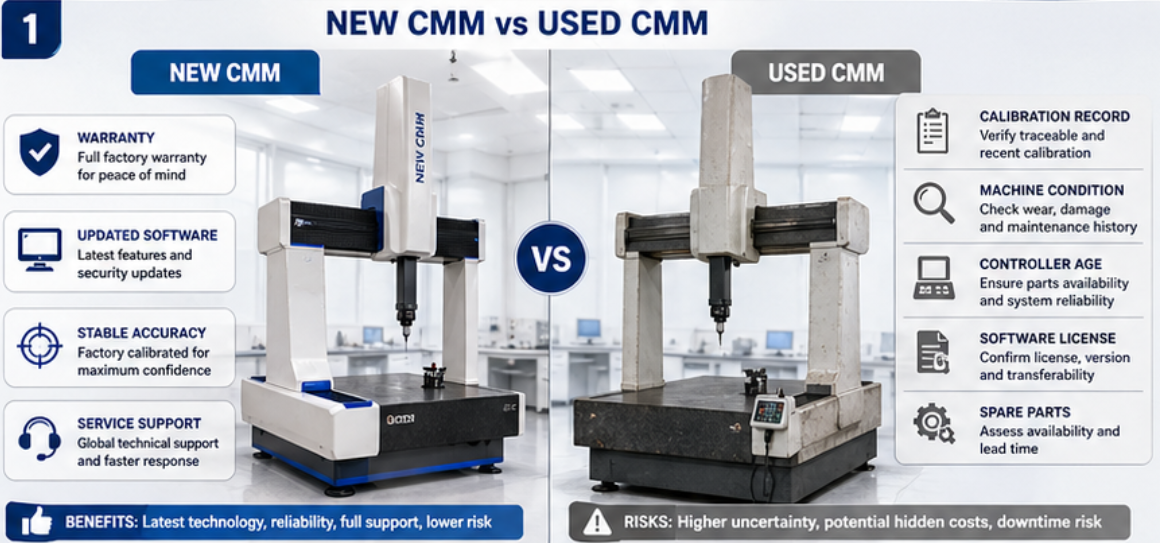
A new coordinate measuring machine is supplied with a confirmed configuration, current software, proper documentation, installation support, training, warranty, and technical service. Buyers can select the measuring range, accuracy level, probe system, software modules, fixture options, and reporting functions according to their real inspection needs.
A used CMM may have a lower purchase price, but the buyer must carefully check its mechanical condition, controller age, software license, probe system, previous usage history, calibration records, transportation condition, installation support, and future maintenance availability. The real cost of a used CMM may become higher if the machine requires repair, software upgrade, controller replacement, or re-calibration after installation.
The key question is not simply “new or used.” The better question is whether the CMM can provide reliable measurement results for your parts, tolerances, inspection workflow, and long-term quality control requirements.
2. New CMM vs Used CMM: Key Comparison
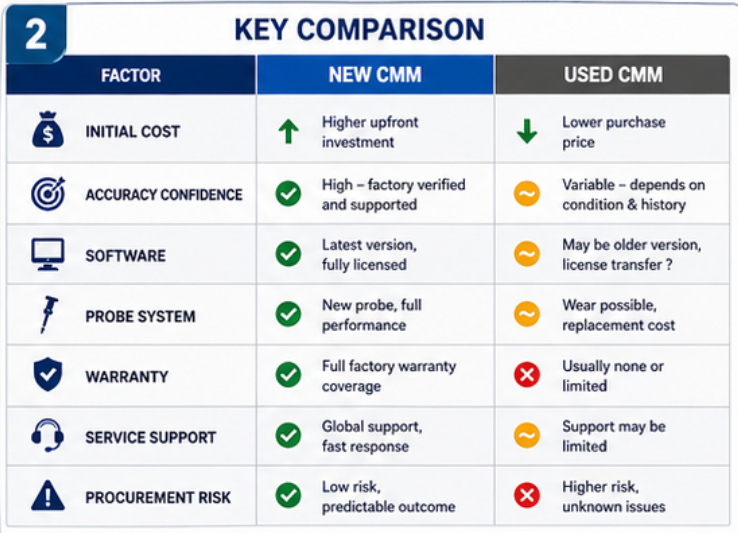
Buyers should compare total value, not only purchase price. A low-cost used CMM may be practical for some applications, but only if its condition and support are reliable. The table below summarizes the main differences.
| Comparison Item | New CMM | Used CMM |
|---|---|---|
| Initial Cost | Higher investment | Lower purchase price, but possible hidden costs |
| Accuracy Confidence | Verified according to new machine specification | Must be checked through calibration and condition inspection |
| Software | Updated license and supported modules | May be outdated, missing, expired, or difficult to transfer |
| Probe System | Configured according to application needs | May need replacement, calibration, or upgrade |
| Warranty | Usually included | Limited or unavailable depending on seller |
| Service Support | Easier installation, training, and after-sales support | Depends on machine age, brand support, and spare parts availability |
| Procurement Risk | Lower risk if configured correctly | Higher risk if inspection is incomplete before purchase |
3. When Is A New CMM The Better Choice?
A new CMM is usually the better choice when measurement reliability, long-term support, updated software, and lower procurement risk are important. For factories that need stable quality control, customer audits, GD&T reports, production inspection, and future expansion, a new machine can provide stronger confidence.
New machines are also easier to configure according to real application needs. Buyers can choose measuring range, accuracy grade, probe system, scanning option, software modules, fixtures, computer system, reporting functions, and automation potential from the beginning.
Choose A New CMM If You Need:
Reliable long-term dimensional inspection
Complete warranty, training, and after-sales support
Current software license and upgrade path
Application-specific probe and fixture configuration
Audit-ready calibration and acceptance documentation
Future expansion for automation, scanning, or data output
For precision machining, automotive, aerospace, medical, mold, and export-oriented quality control, a new CMM often provides better long-term value even if the initial price is higher.
4. When Can A Used CMM Be Considered?
A used CMM may be considered when the budget is limited, the inspection requirement is not extremely demanding, and the machine condition can be verified. It may also be suitable for training, basic inspection, temporary capacity expansion, or low-volume measurement tasks where the accuracy requirement is moderate.
However, a used CMM should only be purchased after a serious technical evaluation. Buyers should confirm calibration status, mechanical condition, controller operation, software license transfer, probe condition, spare parts availability, service support, and transportation risk. A cheap used machine without verified accuracy may become a costly problem after installation.
A Used CMM May Be Suitable If:
The machine has complete calibration and service records
Accuracy and repeatability can be verified before purchase
The controller and software are still supported
The probe system is complete and usable
Spare parts and technical service are available
The inspection task does not require the latest system capability
5. What Buyers Must Check Before Buying A Used CMM
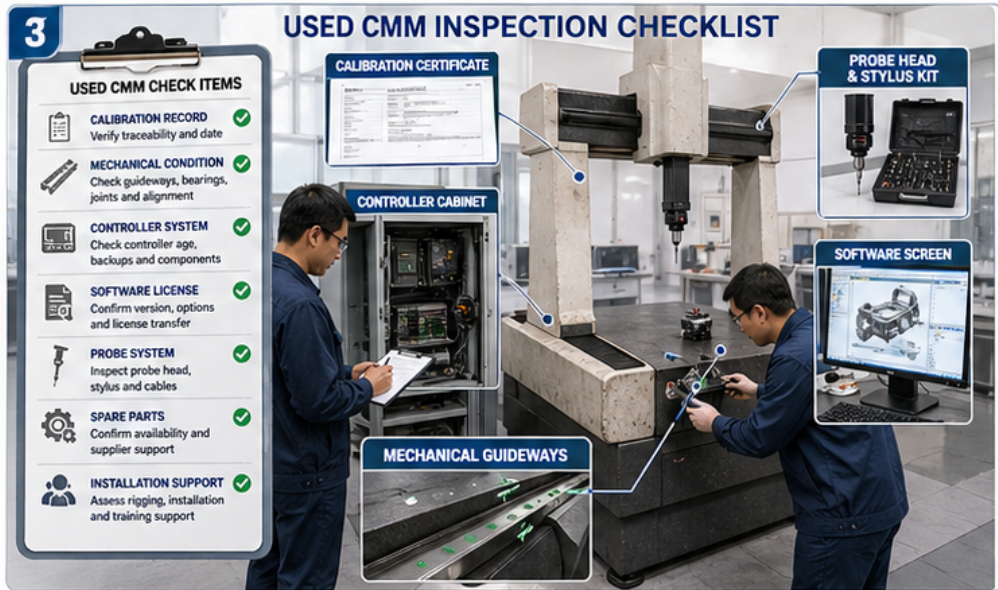
The biggest risk in buying a used CMM is hidden condition uncertainty. The machine may look clean, but internal wear, controller problems, outdated software, or missing accessories may not be obvious. Buyers should use a detailed checklist before making a decision.
| Used CMM Check Item | What Buyers Should Confirm | Risk If Ignored |
|---|---|---|
| Calibration Record | Latest calibration date, result, standard, and accuracy report | Unknown measurement reliability |
| Mechanical Condition | Guideways, table, axes movement, air bearing, structure condition | Poor repeatability or high repair cost |
| Controller System | Controller model, age, communication, support availability | Difficult repair or upgrade |
| Software License | License ownership, transferability, modules, update support | Software may be unusable after purchase |
| Probe System | Probe head, stylus kit, calibration sphere, accessories | Extra cost for probe replacement |
| Spare Parts | Availability of key parts and service technicians | Long downtime if failure occurs |
| Installation Support | Disassembly, transport, reinstallation, leveling, verification | Damage or poor performance after relocation |
6. Do Not Ignore Software And Controller Compatibility
Software and controller issues are common hidden risks in used CMM purchases. Some older machines may still move normally, but the controller may not support modern software, current operating systems, CAD import, GD&T evaluation, automatic reporting, or data export. In some cases, the software license may not be legally transferable to the new buyer.
Buyers should confirm whether the software can support actual inspection tasks. For example, if the factory needs CAD-based programming, GD&T reports, SPC output, or scanning probe data, an old software version may create a major limitation. Upgrading software and controller systems can be expensive, so this cost should be calculated before purchase.
Software And Controller Checklist
Is the software license legal and transferable?
Does the software support the required CAD formats?
Can it handle GD&T evaluation and custom reports?
Is the controller compatible with current software?
Are software updates and technical support available?
Is data export needed for SPC or production systems?
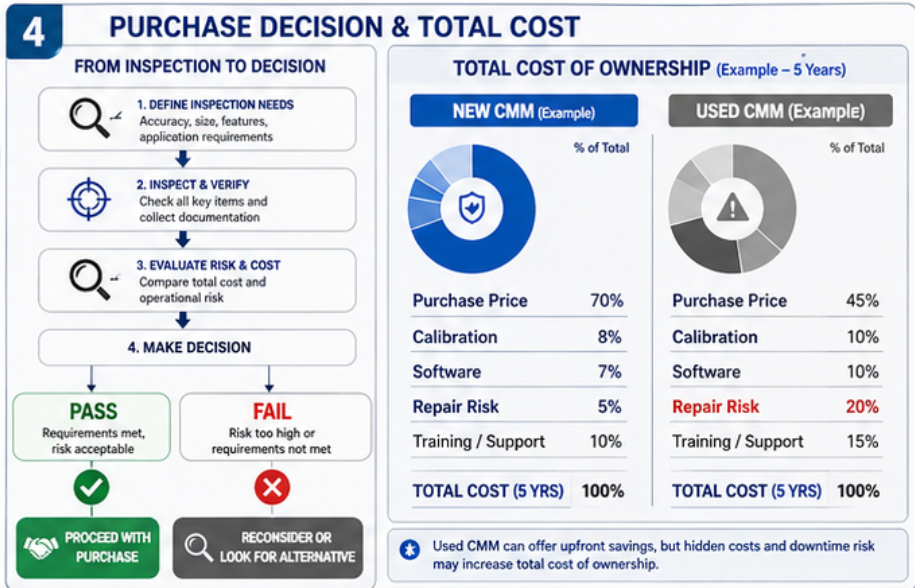
7. Calculate Total Cost, Not Only Purchase Price
A used CMM may have a lower purchase price, but total cost may include transportation, disassembly, reinstallation, calibration, controller repair, software upgrade, probe replacement, fixture modification, training, and future maintenance. Buyers should calculate all costs before comparing it with a new CMM quotation.
| Cost Item | New CMM | Used CMM |
|---|---|---|
| Machine Purchase | Higher initial cost | Lower initial cost |
| Calibration | Usually included or clearly arranged | May need additional verification after relocation |
| Software | Current license included by configuration | May require license transfer, upgrade, or replacement |
| Repair Risk | Lower during warranty period | Higher if condition is uncertain |
| Training And Support | Usually planned with installation | May need separate service arrangement |
In many cases, the lowest purchase price is not the lowest total cost. Buyers should evaluate risk, downtime, technical support, and long-term usability before making a final decision.
8. What Information Should Buyers Prepare Before Deciding?
Whether choosing a new CMM or used CMM, buyers should first define their real inspection requirements. Without a clear application review, it is easy to buy a machine that looks suitable but cannot support daily quality control.
Recommended Information Checklist
Part drawings and CAD files
Maximum part size, weight, and material
Critical dimensions and tolerance requirements
GD&T, reporting, and traceability needs
Inspection frequency and production volume
Required probe system, scanning option, and software functions
Installation environment and site conditions
Budget range and acceptable long-term risk level
Need for warranty, training, calibration, and after-sales support
9. Common Mistakes Buyers Should Avoid
Choosing a used CMM only because the price is low.
Ignoring calibration records and current accuracy condition.
Not checking whether the software license can be legally transferred.
Underestimating controller age and spare parts availability.
Forgetting transportation, reinstallation, and site calibration cost.
Buying a machine without checking probe system and accessories.
Comparing only machine price instead of total cost of ownership.
Choosing a CMM before confirming part tolerance, measuring range, and software needs.
Avoiding these mistakes helps buyers reduce procurement risk and select a CMM system that can support real inspection work after installation.
Conclusion
Both new CMM and used CMM options can be reasonable depending on the buyer’s budget, application, accuracy requirement, and risk tolerance. A new CMM usually offers better warranty, updated software, easier configuration, and stronger long-term support. A used CMM may reduce initial investment, but buyers must carefully check calibration, mechanical condition, controller compatibility, software license, probe system, spare parts, and total ownership cost. The best choice is the machine that can provide reliable, repeatable, and supported measurement results for your real inspection tasks.
Need Help Choosing Between New CMM And Used CMM?
Contact us to discuss your part drawings, tolerance requirements, inspection workflow, budget, software needs, and long-term quality control plan. We can help you evaluate a suitable CMM solution for reliable industrial measurement.