



How To Select CMM Measurement Software For GD&T Inspection
2026-05-13 22:58How To Select CMM Measurement Software For GD&T Inspection
CMM measurement software plays a critical role in GD&T inspection. A coordinate measuring machine may provide the mechanical platform, but the software determines how measurement points are collected, how datums are established, how geometric tolerances are calculated, and how inspection reports are generated. For precision machined parts, automotive components, aerospace parts, molds, fixtures, and industrial assemblies, choosing the right CMM software can directly affect inspection accuracy, reporting efficiency, operator productivity, and customer quality approval.
Quick Answer
To select CMM measurement software for GD&T inspection, buyers should check CAD import capability, datum alignment functions, geometric tolerance evaluation, probe path programming, report customization, SPC data output, operator usability, compatibility with the CMM and probe system, and support for repeatable inspection workflows. The right software should help quality teams inspect parts accurately, document results clearly, and reduce manual calculation errors.
1. Why GD&T Inspection Requires Strong Measurement Software
GD&T inspection is more complex than simple length, width, height, or diameter measurement. It involves datums, feature relationships, position tolerance, flatness, parallelism, perpendicularity, profile, concentricity, runout, and other geometric requirements. These results must be calculated correctly according to the drawing requirement and inspection strategy.
Without suitable CMM software, operators may need to perform more manual calculations, create inconsistent datum setups, or generate reports that are difficult for engineers and customers to understand. This can increase inspection time and create quality disputes. Strong GD&T software helps standardize the inspection process and makes results easier to verify.
For automotive, aerospace, precision machining, medical, electronics, and mold manufacturing applications, GD&T software capability is often just as important as the CMM machine accuracy itself.
2. Check CAD Import And Model-Based Inspection Capability
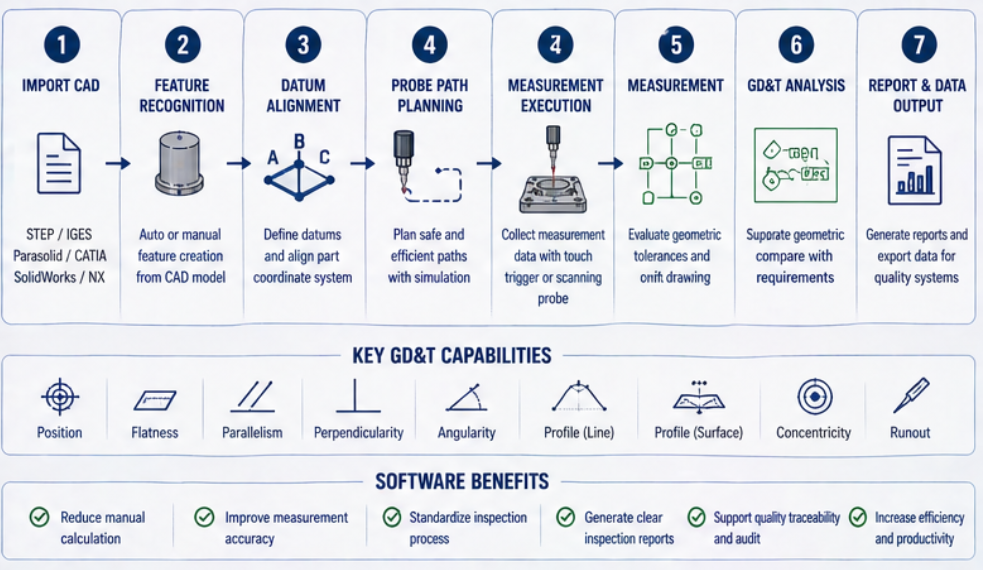
Modern GD&T inspection often starts from a CAD model. Buyers should check whether the CMM software can import common CAD formats and use the model for programming, feature selection, measurement planning, nominal data comparison, and report generation. CAD-based inspection can reduce manual input and improve programming efficiency.
If the software supports model-based definition or clear CAD annotation handling, it can help engineers understand inspection requirements faster. This is especially useful for complex machined parts, aerospace brackets, automotive housings, molds, and components with many datum references.
| Software Capability | What Buyers Should Check | Why It Matters |
|---|---|---|
| CAD Import | Support for common 3D CAD file formats | Reduces manual programming and nominal data input |
| Feature Selection | Ability to select holes, planes, cylinders, profiles, and surfaces from CAD | Improves programming speed and inspection consistency |
| CAD Comparison | Measured data compared with nominal CAD geometry | Helps evaluate profiles, surfaces, and complex geometry |
| Offline Programming | Program creation without occupying the CMM machine | Improves machine utilization and inspection planning |
| Model-Based Inspection | Use of CAD model and annotations for inspection planning | Supports complex parts and engineering communication |
3. Evaluate Datum Alignment And GD&T Calculation Functions
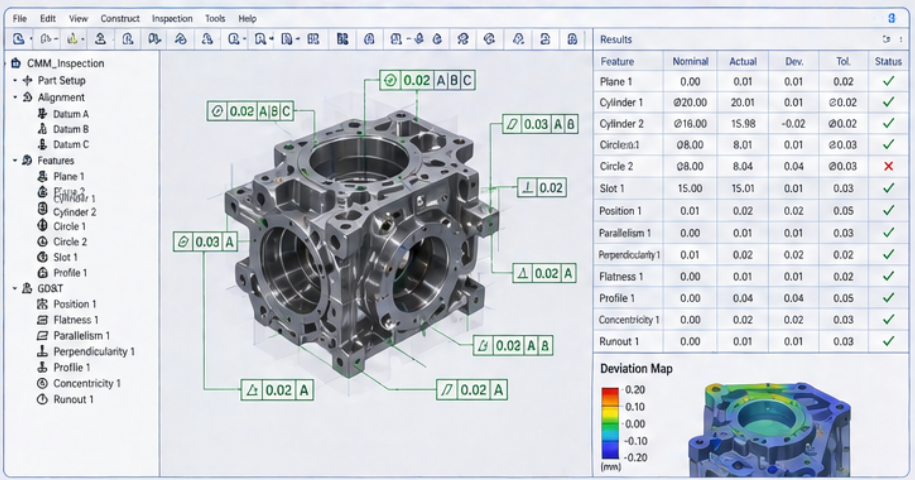
Datum alignment is the foundation of GD&T inspection. If the datum structure is not created correctly, the final tolerance results may be misleading. Buyers should check whether the software supports standard datum setup, multiple alignment methods, feature-based alignment, best-fit alignment when appropriate, and clear control of datum references.
The software should also support common GD&T evaluation functions such as position, flatness, straightness, roundness, cylindricity, parallelism, perpendicularity, angularity, profile of a line, profile of a surface, concentricity, symmetry, and runout. Buyers should confirm these functions based on the actual drawings they need to inspect.
GD&T Function Checklist
Datum setup and alignment control
Position tolerance evaluation
Flatness, straightness, roundness, and cylindricity
Parallelism, perpendicularity, and angularity
Profile of line and profile of surface
Concentricity, symmetry, circular runout, and total runout
Clear pass/fail judgment based on drawing tolerance
Traceable report output for customer or internal quality review
4. Match Software With Probe System And Measurement Strategy
CMM software must work smoothly with the selected probe system. A touch trigger probe may be enough for many holes, planes, points, and standard geometric checks. A scanning probe may be required for profiles, freeform surfaces, turbine blades, molds, or components that need dense data collection. The software should support the measurement strategy required by the part.
Buyers should confirm whether the software can create safe probe paths, simulate measurement movement, manage stylus configurations, support probe qualification, and prevent collision risk. For complex parts, probe path planning and simulation can save programming time and reduce machine downtime.
A software package should not be selected separately from the probe and fixture. The best result comes from matching machine, probe, fixture, software, and inspection workflow together.
5. Check Reporting, Traceability And Data Output
Inspection reports are one of the most important outputs of CMM measurement software. Buyers should check whether the software can generate clear, professional, and customizable reports. The report should show measured values, nominal values, deviation, tolerance, pass/fail result, datum references, inspection date, operator information, and part identification when needed.
For automotive, aerospace, medical, and export manufacturing, traceability is especially important. Buyers may need report templates that support customer requirements, audit documentation, production records, and long-term quality tracking. Data export functions may also be needed for SPC, MES, ERP, or internal quality systems.
| Report / Data Function | What To Confirm | Practical Value |
|---|---|---|
| Custom Report Template | Logo, part information, tolerance table, pass/fail summary | Improves customer communication and internal review |
| GD&T Result Output | Datum reference, tolerance zone, measured result, deviation | Makes geometric tolerance results easier to understand |
| SPC Data Export | Export to common formats or quality systems | Supports process control and trend analysis |
| Traceability Information | Operator, date, machine, program version, part ID | Supports audit and long-term quality records |
| Visual Deviation Map | Color map or graphical deviation display | Helps engineers identify part problems faster |
6. Consider Operator Usability And Training Requirements
A powerful software system is useful only if operators can use it correctly. Buyers should evaluate whether the interface is clear, whether common functions are easy to find, whether measurement programs can be created efficiently, and whether reports can be generated without excessive manual work.
Operator training should be included in the software selection plan. Quality teams need to understand datum setup, probe qualification, program creation, GD&T evaluation, report generation, and troubleshooting. If only one engineer knows how to use the software, the factory may face operational risk when production workload increases.
For daily production inspection, software should help standardize measurement work, not make the process more difficult.
7. Match Software Level With Application Type
Not every buyer needs the most advanced software module. The best choice depends on part complexity, GD&T requirements, reporting needs, production volume, and future inspection plans. Buyers should choose software that fits current work while leaving room for future upgrades.
| Application Type | Software Priority | Recommended Focus |
|---|---|---|
| Basic Machined Parts | Feature measurement and standard reports | Easy operation, stable program, clear report output |
| Automotive Components | GD&T and batch reporting | Position tolerance, repeatability, SPC data export |
| Aerospace Parts | Traceable GD&T and complex geometry inspection | Datum control, profile analysis, audit-ready reports |
| Mold And Die Parts | CAD comparison and profile analysis | Surface deviation map, scanning data, CAD model comparison |
| High-Volume Production | Automatic reporting and data integration | Program control, barcode, SPC, MES or quality system output |
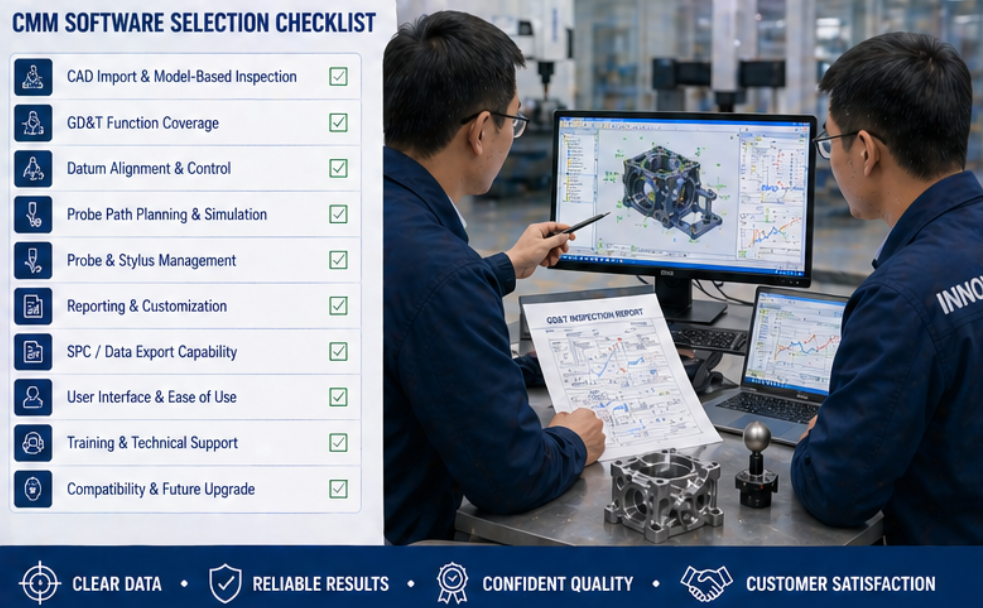
8. Common Mistakes To Avoid When Selecting CMM Software
Choosing software only by price without checking GD&T functions.
Ignoring CAD import and offline programming needs.
Using software that cannot evaluate required datum structures correctly.
Not checking compatibility with probe systems, styli, and scanning options.
Buying software without confirming report templates and data export functions.
Underestimating operator training and daily usability.
Failing to test software with real part drawings and sample inspection tasks.
Not considering future upgrade needs for automation, SPC, or production data integration.
Avoiding these mistakes helps buyers select software that supports real quality control work instead of becoming a limitation after the CMM is installed.
9. What Information Should Buyers Prepare Before Quotation?
To recommend suitable CMM measurement software, the supplier needs to understand the buyer’s inspection work. A simple request for “CMM software” is usually not enough. Buyers should prepare real drawings, CAD files, tolerance requirements, report requirements, and current inspection problems.
Recommended Information Checklist
Part drawings and CAD files
Required GD&T symbols and datum structure
Critical dimensions and tolerance ranges
Part type, material, size, and inspection frequency
Probe type, stylus configuration, and scanning needs
Required report format and customer documentation needs
Need for SPC, MES, ERP, or other data export
Operator skill level and training requirements
Conclusion
Selecting CMM measurement software for GD&T inspection requires more than checking whether the software can generate a basic report. Buyers should evaluate CAD import, datum alignment, GD&T calculation, probe compatibility, programming efficiency, reporting flexibility, traceability, data output, and operator usability. The right software should help quality teams measure complex parts accurately, reduce manual errors, standardize inspection methods, and generate clear reports for production control and customer approval. By testing the software with real drawings and inspection requirements before purchase, buyers can reduce risk and build a more reliable CMM inspection process.
Need Help Selecting CMM Software For GD&T Inspection?
Contact us to discuss your part drawings, GD&T requirements, CAD files, probe system, report format, and inspection workflow. We can help you evaluate a suitable CMM measurement software solution for reliable industrial inspection.